Distribution
React Native Stallion Distribution - Learn how to distribute and monitor releases. Track adoption metrics and manage OTA update rollouts with analytics. React Native dashboard for OTA updates.
Distribution
Rolling Out Release
Prerequisite:
So far, you should have successfully promoted a bundle to production. If not, refer to Production Usage.
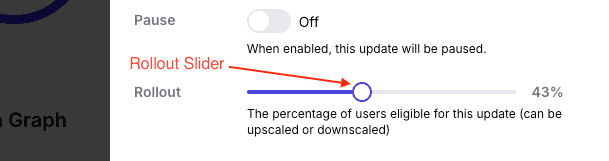
By default, when a bundle is promoted to production, the initial rollout is set to
0% and only users logged into the SDK will receive the latest update. Now we will
increase the rollout percent to users goto: Release > App version > Manage
release. Increase the slider to your desired percent and click Update Release.
How does phased rollout works ?
Phased rollout operates on an algorithm that randomly selects UIDs, which are generated during app initialization by the Stallion SDK. Each user is identified using their unique UID.
NOTE:
UID does not persist across installations. This means that if a user uninstalls and then reinstalls the app, a new UID will be generated for them.
Release Adoption Dashboard
The React Native Stallion dashboard (also known as the React Native OTA dashboard or dash for React Native) provides powerful metrics of app adoption that gives you valuable insights about your release. The release dashboard is divided into 3 parts.
1. User Count & General Info
The User Count & General Info section presents key details about the latest release:
- App Version
- Total Users
- Rollout
- Platform
- Bundle Hash
- Release Note
This information helps track the scope and status of the deployment.
2. Adoption Stats
The Adoption Stats section summarizes the number of downloads, installs, and rollbacks:
- Downloads: Total download completes
- Installs: Total installs
- Rollbacks: Total Auto Rollbacks
This data indicates how many users have engaged with the release, successfully installed it, and reverted to a previous version.
3. Adoption Graph
The Adoption Graph visualizes trends in download count, install count, and rollback count over a period of 1 Month.